Support » Pololu TReX Jr User’s Guide »
3. Getting Started
- 3.a. Motor and Power Connections
- 3.b. Signal Connections
- 3.c. Jumper Settings
- 3.d. LED Feedback
- 3.e. Automatic Calibration for Your RC/Analog Controller
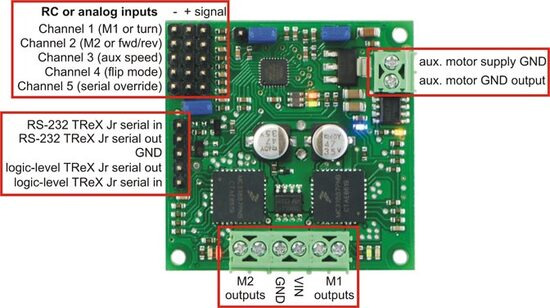 |
TReX Jr input/output connection points |
|---|
Getting started with your TReX Jr can be as simple as connecting power, your motors, and your RC or analog control signals (see Section 3.a and Section 3.b). Configure your jumpers for RC or analog mode (see Section 3.c) and you’re good to go. While it’s running, the TReX Jr will communicate with you via its LEDs (see Section 3.d). Once you have all your connections in place, we recommend your first step be to calibrate your TReX Jr for your particular RC or analog controller (see Section 3.e).
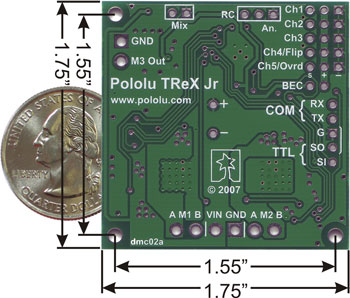 |
Pololu TReX Jr bottom with labels and dimensions |
|---|
Related products


Home | Forum | Blog | Support | Ordering Information | Lists | 曰韩内射六十七十老熟女影视 | BIG Order Form | About | Contact
© 2001–2026 Pololu Corporation



